

 Tiếng Việt
How to Order
How to Order
Step 1: Visit thomore.vn and browse for the perfume you would like to buy.
Step 2: Open the product you want and press “ADD TO CART”. The product is added to your cart.
Step 3: Review your cart. The cart page gives you a few options:
- To keep shopping: press continue shopping to add more products to your cart.
- To change a product: choose the quantity and press “UPDATE CART”.
- To use a promotion code: enter the code and press APPLY, or select one of the codes you already have.
- To place your order and pay: press CHECKOUT.
Step 4: Enter your billing details in full.
- If you already have an account, sign in with your email and password, or with your Facebook, Google or TikTok account.
- If you would rather buy without an account, simply skip the sign-in step.
Step 5: Choose a delivery option and a payment method.
Step 6: Check your order details, add any notes and press PLACE ORDER.
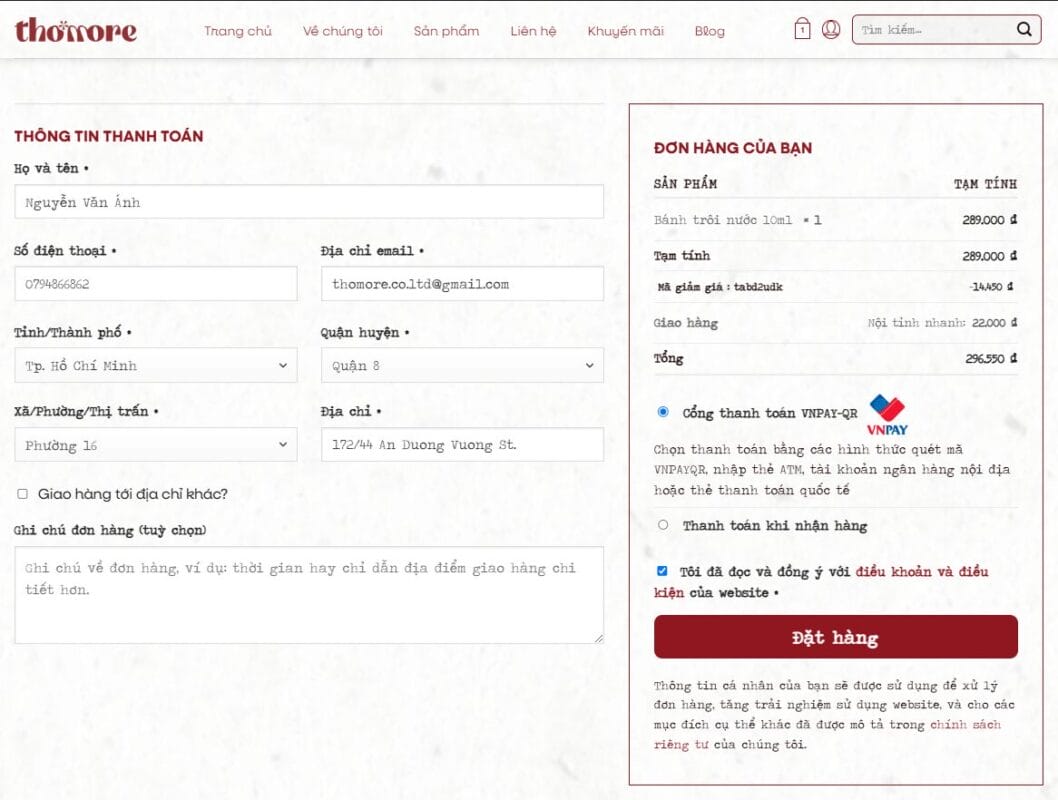
Once we receive your order, we will call you to confirm the order and your delivery address.
Thank you for shopping with Thơmore.
 Tiếp tục với Zalo